Marketing
Lead Ads Follow-up
Sends WhatsApp template messages to people who fill your Facebook and Instagram Lead Ads forms, after the delay you choose, from the channel and template you pick, and stops when someone on your team or the customer has already taken over.
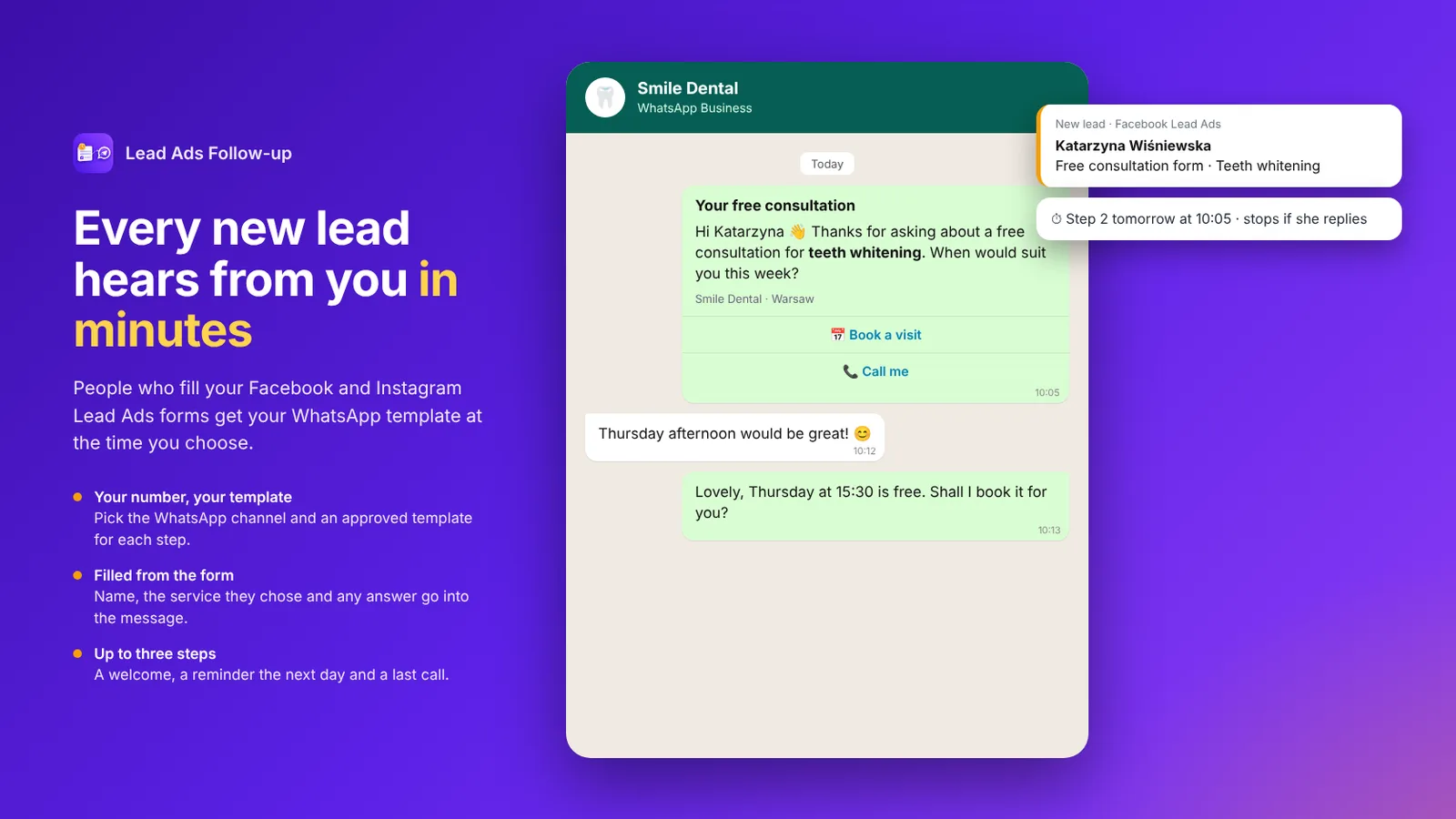
Lead Ads Follow-up sends WhatsApp messages to the people who fill your Facebook and Instagram Lead Ads forms, at the time you choose, so a new lead hears from you while they still remember the ad.
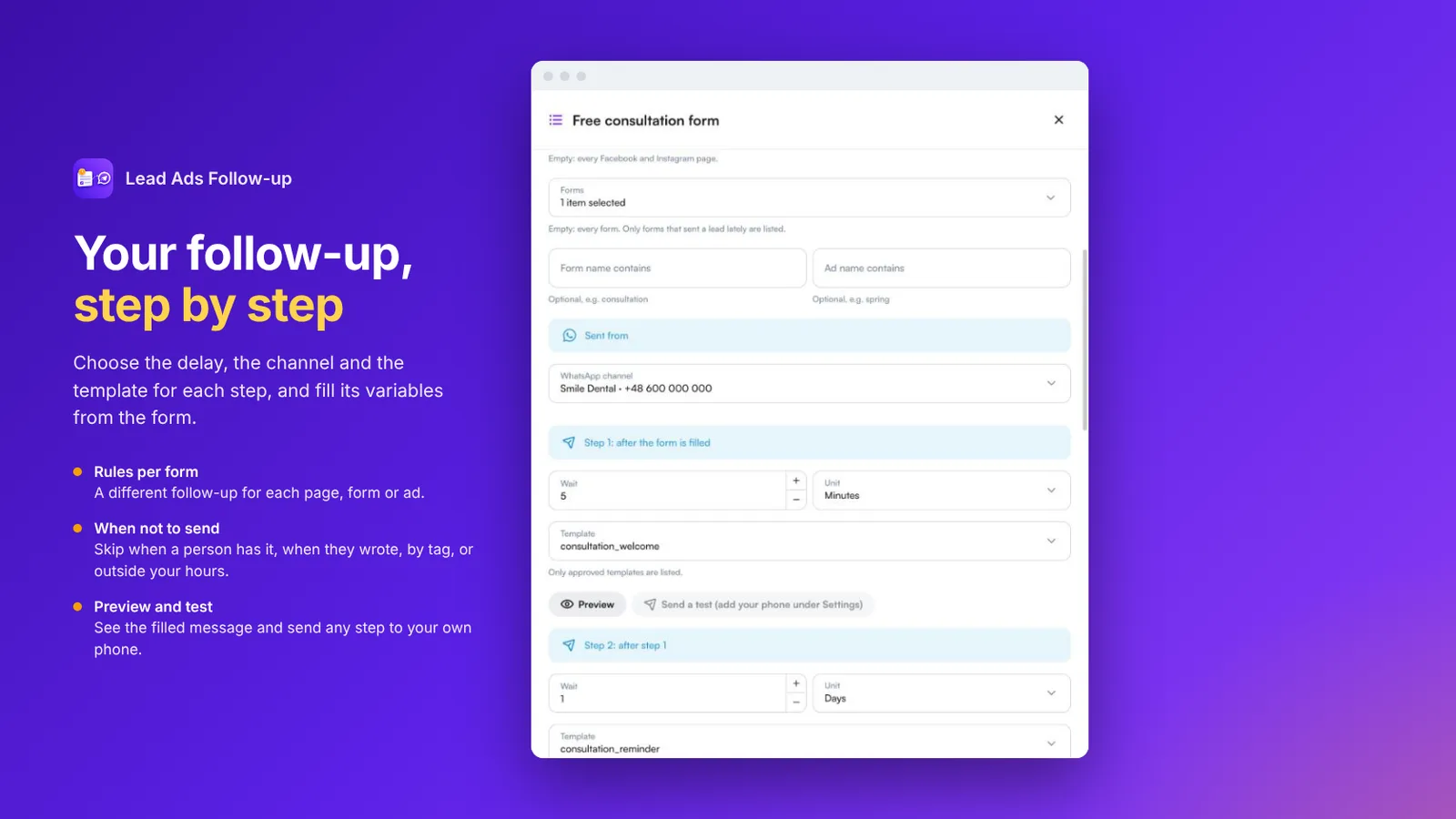
You set a rule for each page, form or ad: the WhatsApp number to send from, the approved template for each message, and when not to send.
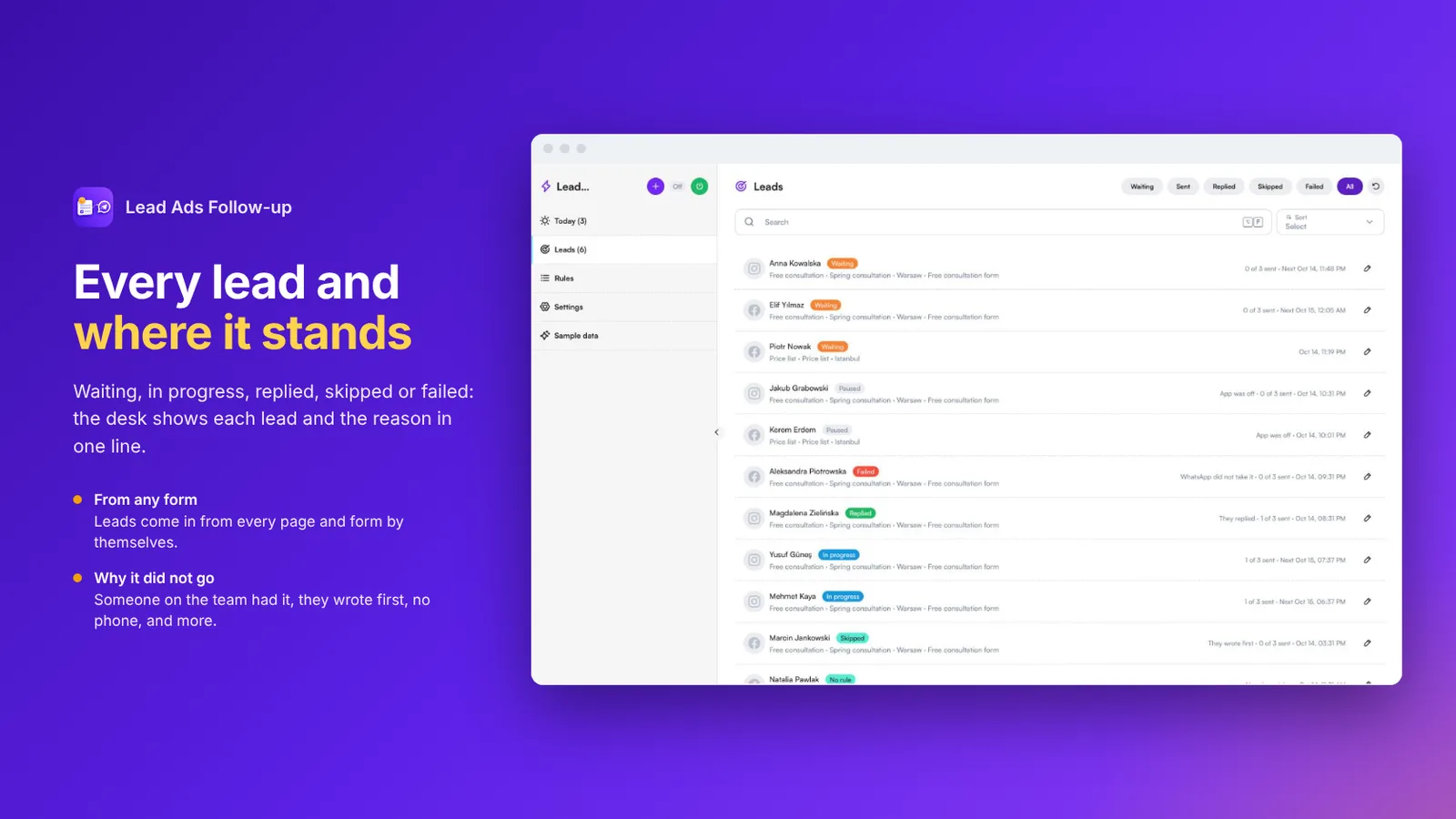
A desk shows the leads waiting, what was sent and when, who replied, and why a message did not go.
In the UAE
Follow up Meta Lead Ads from property launches, clinics and schools while the ad is still fresh.
What it does
-
Your channel, your template
Choose the WhatsApp number to send from and the approved template for each message. Fill the template’s variables from the form’s answers (name, the service they chose, any question), the form or ad name, or your own text.
-
Up to three steps
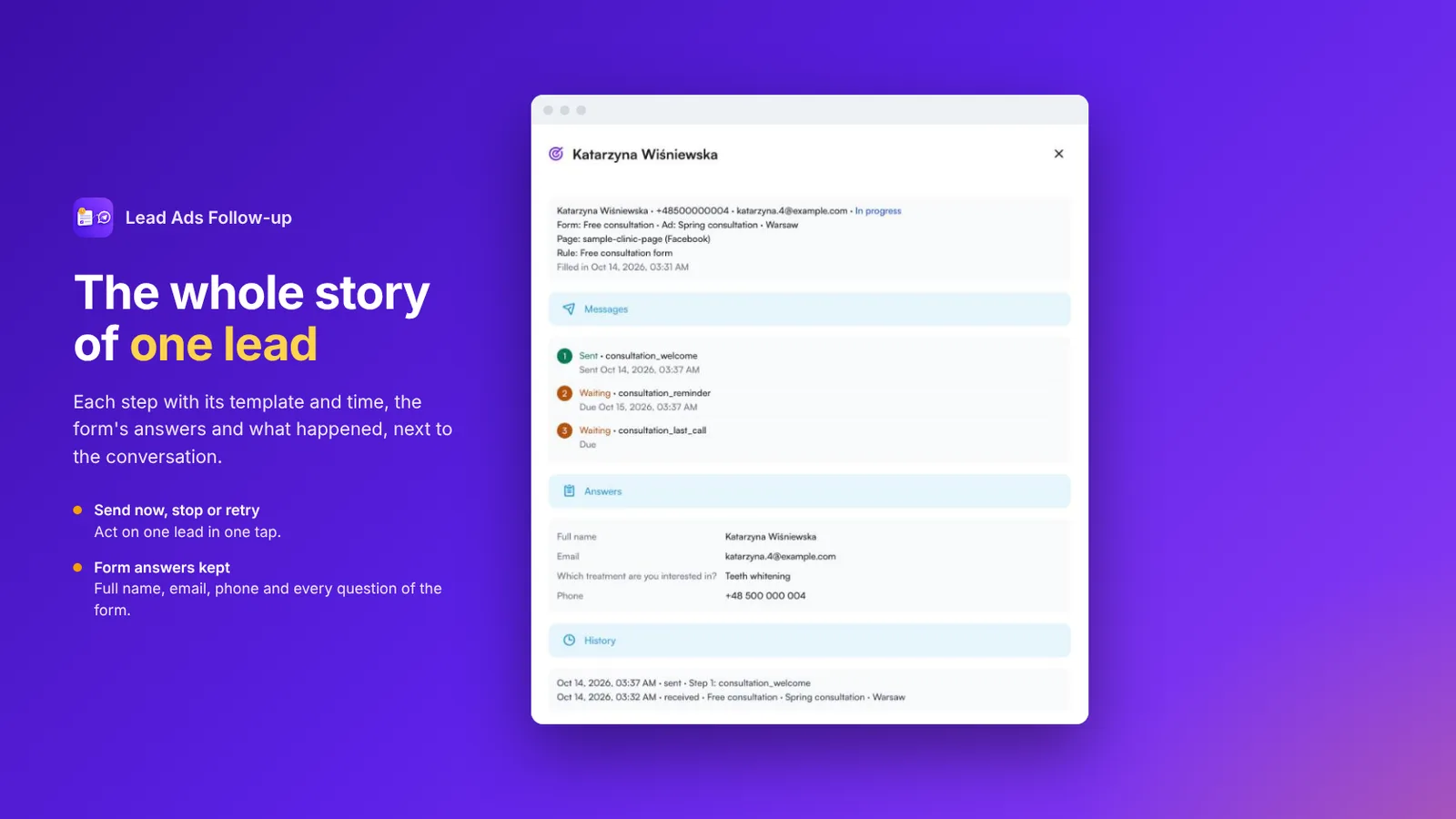
For example a welcome a few minutes after the form, a reminder the next day and a last message after three days. When the person replies, the remaining steps stop.
-
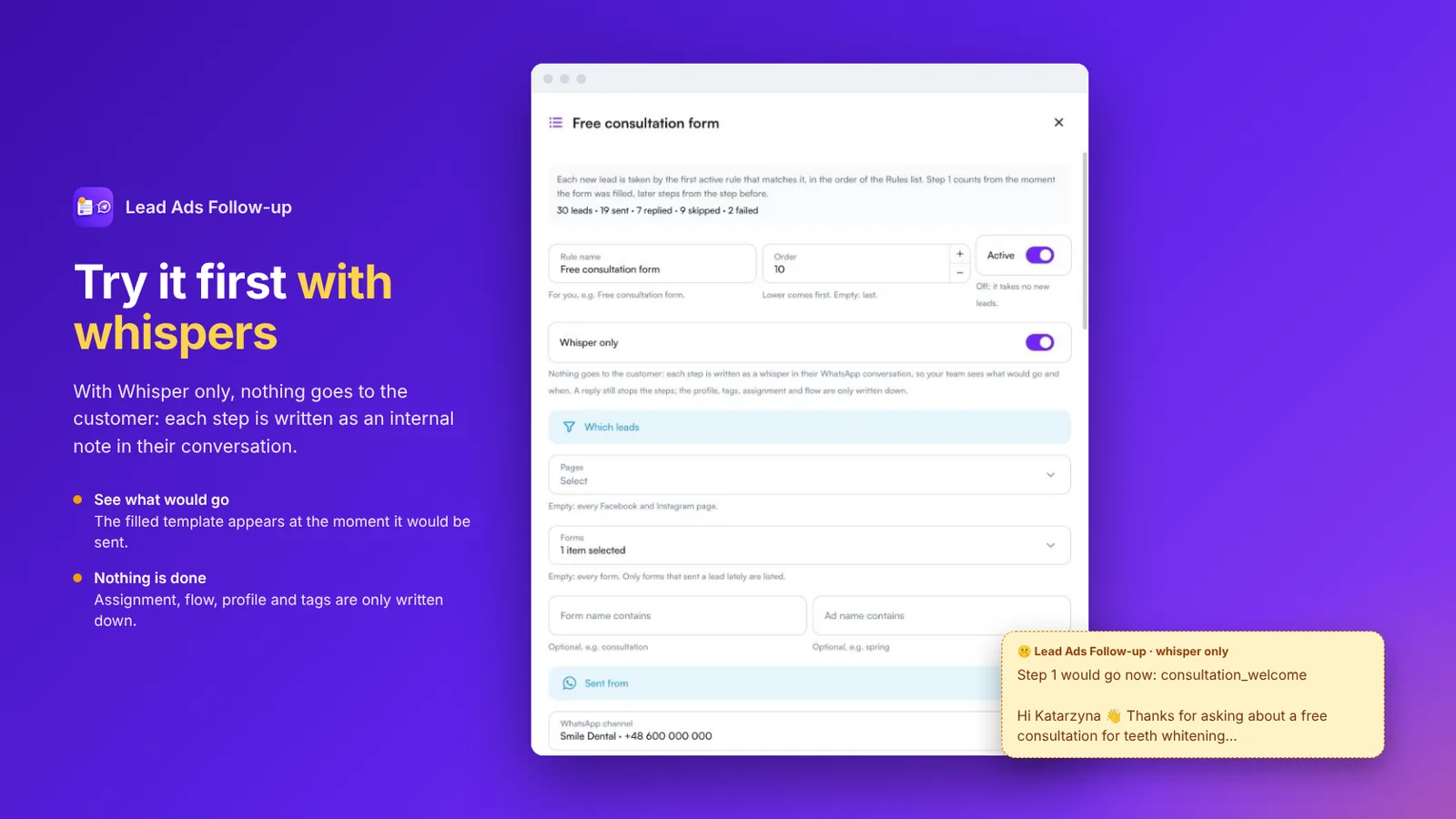
Try it with whispers
Turn on Whisper only on a rule and nothing goes to the customer: each step is written as an internal note in their WhatsApp conversation at the moment it would go, with the filled template.
Inside the app
-
Rules per form
A different follow-up for each page, form or ad. Header images, videos, documents and link buttons in templates are supported.
-
When it does not send
Each is a switch on every rule: someone on your team is already handling the conversation, the person has already written to you, the same number got a message in the last days, the person has (or does not have) certain tags, or it is outside your send hours.
-
After the message
Fill the customer’s profile and a note from the form’s answers and add tags. When the person replies, assign the conversation to a team or a person, or start one of your flows, for example your AI assistant.
-
The desk
Leads waiting, what was sent and when, who replied, and why a message did not go. Send a step now, stop a lead, or retry a failed message.
-
Send a test
A test button sends any step to your own number before you switch a rule on.
-
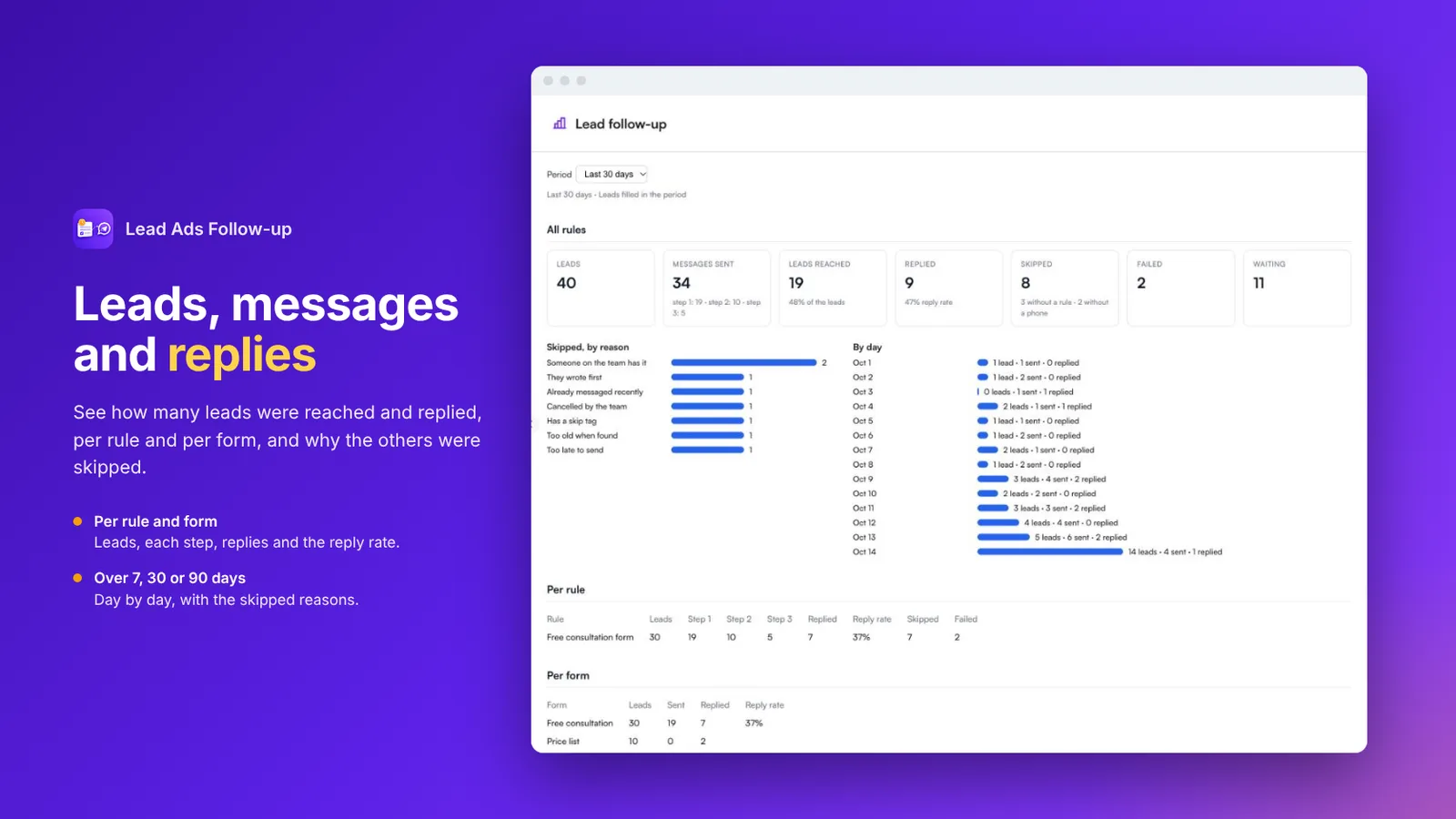
Reports
Leads, messages and replies per rule and per form.
Getting started
-
Install the app
Install Lead Ads Follow-up in your workspace. Sample data lets you see the screens before your first lead arrives.
-
Check lead forms and templates
Lead forms must be switched on for your Facebook page in MonoChat (Channels › your page › Lead forms), and your WhatsApp number needs approved templates. The app checks both for you.
-
Create a rule
Pick the page, form or ad, the WhatsApp number, up to three steps with their delay and template, and when not to send.
-
Try it, then turn it on
Use Whisper only or the test button to see what would go, then switch the rule on.
Good to know
- Leads that came in before the app was switched on are not messaged.
- Messages outside your send hours wait for the next opening instead of going at night.
Screens
FAQ
Frequently asked questions
Short answers to the questions we hear most.
What does it need to work?
Lead forms switched on for your Facebook page in MonoChat (Channels › your page › Lead forms) and approved WhatsApp templates on your number. The app checks both for you.
Does it work with Instagram lead forms?
Yes. It follows up people who fill your Facebook and Instagram Lead Ads forms.
How many messages can it send to one lead?
Up to three steps per rule, for example a welcome a few minutes after the form, a reminder the next day and a last message after three days. The remaining steps stop when the person replies.
When does it not send?
Each of these is a switch on every rule: someone on your team is already handling the conversation, the person has already written to you, the same number got a message in the last days, tags, and your send hours.
Can I try it without messaging real leads?
Yes. With Whisper only, each step is written as an internal note in the customer’s WhatsApp conversation instead of being sent. A test button also sends any step to your own number.
Are older leads messaged?
No. Leads that came in before the app was switched on are not messaged.
Other apps
-

Google Review Requests
Asks customers for a Google review after their visit, with your review link for each branch, fairly and with an easy way to stop. -

ClickUp Lead Sync
Turns leads and orders from your conversations into ClickUp tasks, and brings your team’s changes back to MonoChat. -

MonoChat Toolkit
Ready-made AI tools and flow nodes: menus, surveys, appointments, leads, coupons, branches, email, Google Sheets and more. -

MonoChat Start
Give it your website, and in two minutes an AI assistant answers your customers on WhatsApp, Instagram and your site. -

CompanyAI
An AI assistant built from your website: it learns your products, policies and FAQs, sends requests and complaints to the right department as tasks, and searches your Shopify store. -
MonoChat Tasks
Turn conversations into tasks: assign them, move them through your own states, discuss them in comments and set reminders, next to the chat. -

WhatsApp Template API
Send approved WhatsApp templates from your CRM, ERP or online shop with one API call; replies arrive in your MonoChat inbox. -
Session Link
One API call returns a link to a customer’s conversation in MonoChat, creating the customer and the conversation if needed, and can assign it to an agent or workgroup. -

Ads Referral Report
See which Meta ads and posts start conversations: every chat from a click-to-WhatsApp or Instagram ad, by ad, day and channel.
First month of Growth on us
Bring every customer conversation into one place.
Connect your first channel in minutes. Basic is free for 1,000 outgoing messages a month.
One code per business • 30 days to redeem • No card needed