Marketing
Google Review Requests
Asks your customers for a Google review after their visit, on WhatsApp and your other channels, in their own language, with your review link for each branch. Your CRM, POS or a file sends the customers; MonoChat sends the request at the right time, fairly.
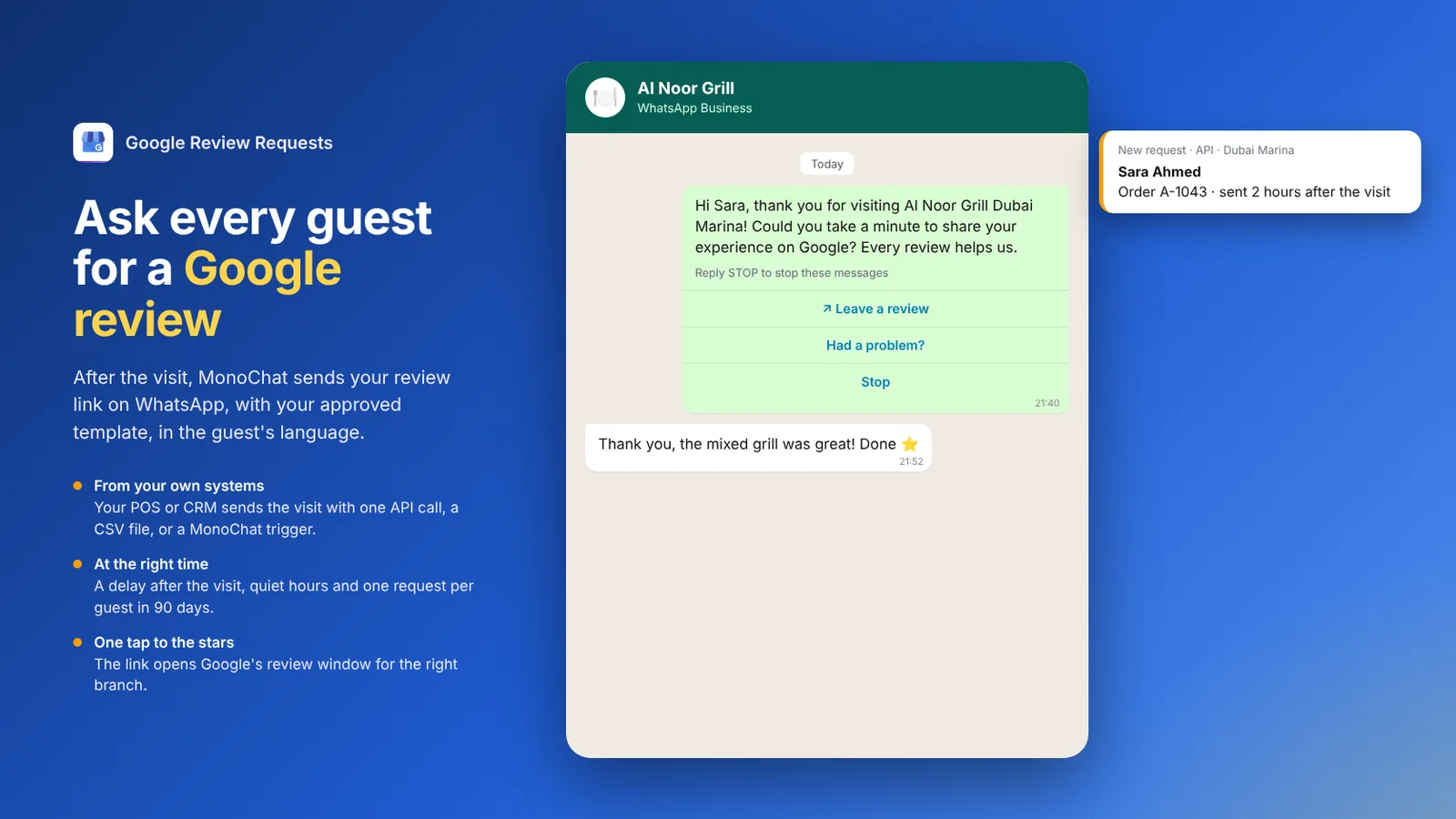
Google Review Requests asks your customers to leave a Google review after their visit, on WhatsApp and on the other channels you use in MonoChat. Built for restaurants, clinics, salons, shops and any business with one or more branches.
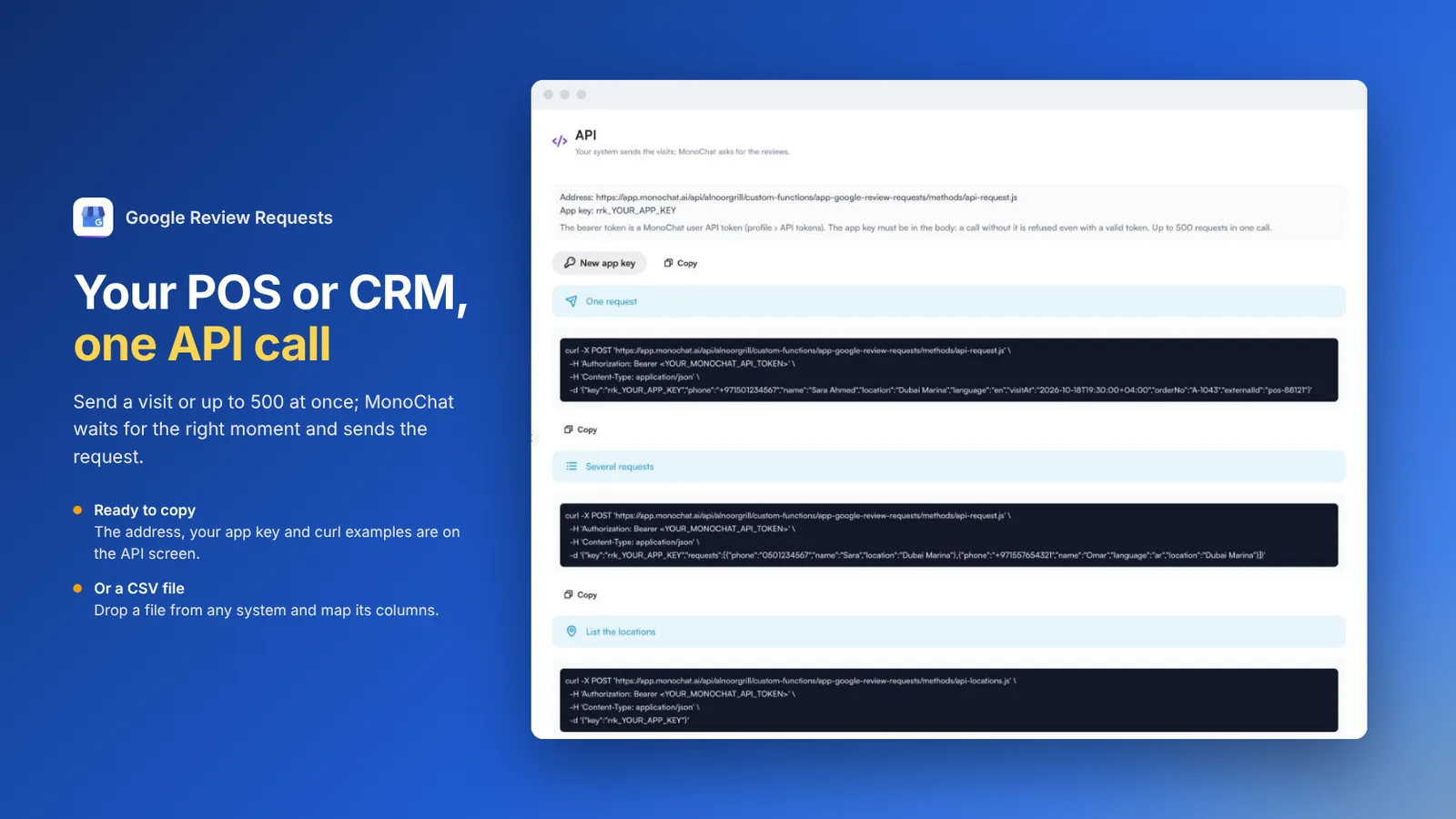
Your CRM, POS or booking system sends the customers of the day, through a simple API or a CSV file. MonoChat sends each of them a short, friendly message with your Google review link at the right time, in their own language.
Every customer gets the link, there are no rewards, and stopping is one tap away. Today and the reports show what was sent, read and answered, and with your own Google Places API key, how each branch’s rating moves.
In the UAE
Reviews for every branch, in the language each customer writes in.
What it does
-
One link per branch, in every language
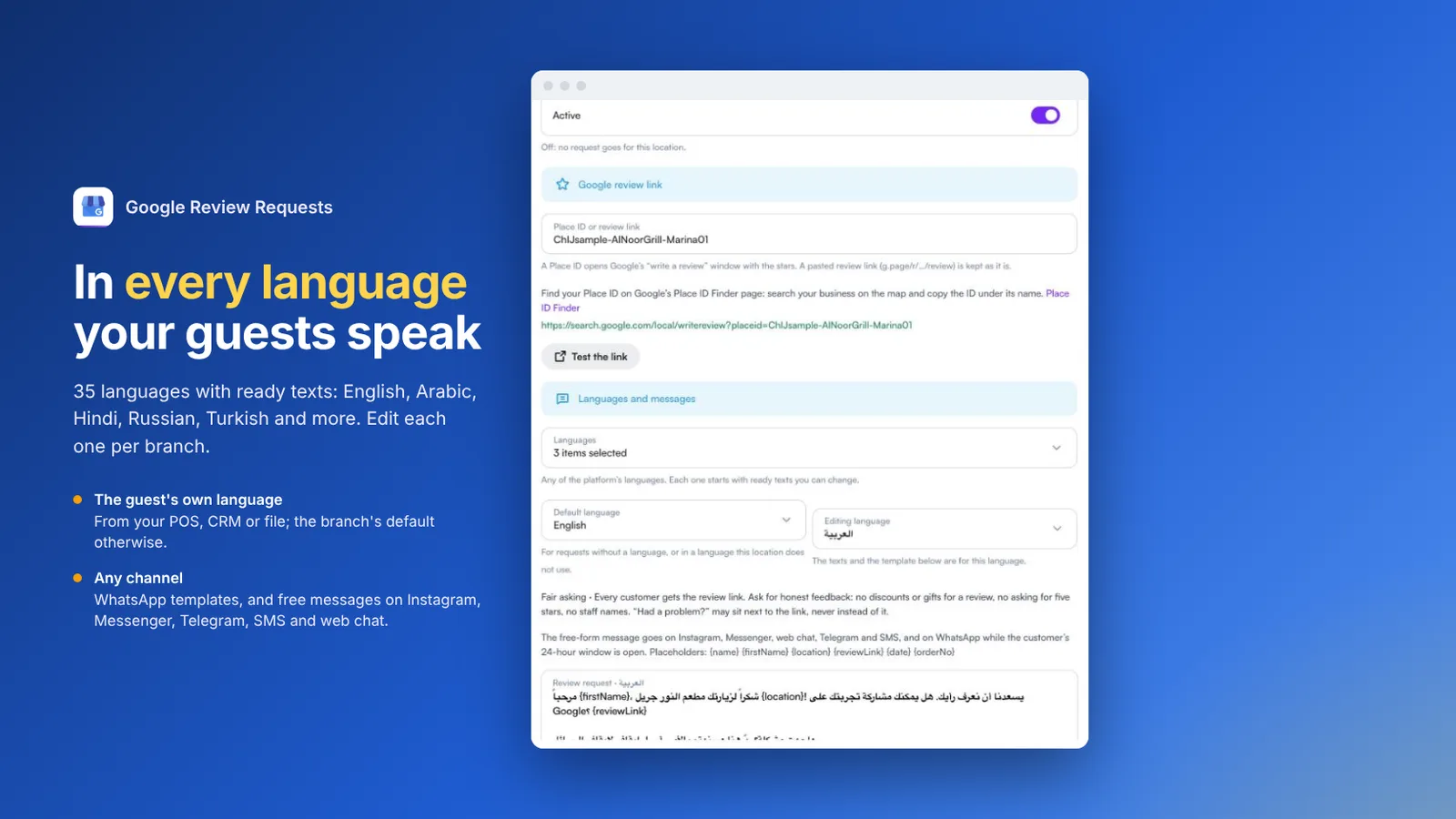
Each location has its own Google review link, from a Place ID or a pasted review link, with “Test the link” before anything goes out. Ready translations of every message come in all 35 languages of MonoChat, and you can change every text.
-
WhatsApp done right
While the customer’s 24-hour window is open the cheaper free-form message goes; outside it, an approved template in the customer’s language. One template can serve every branch, and a ready template is included in every language.
-
Fair asking
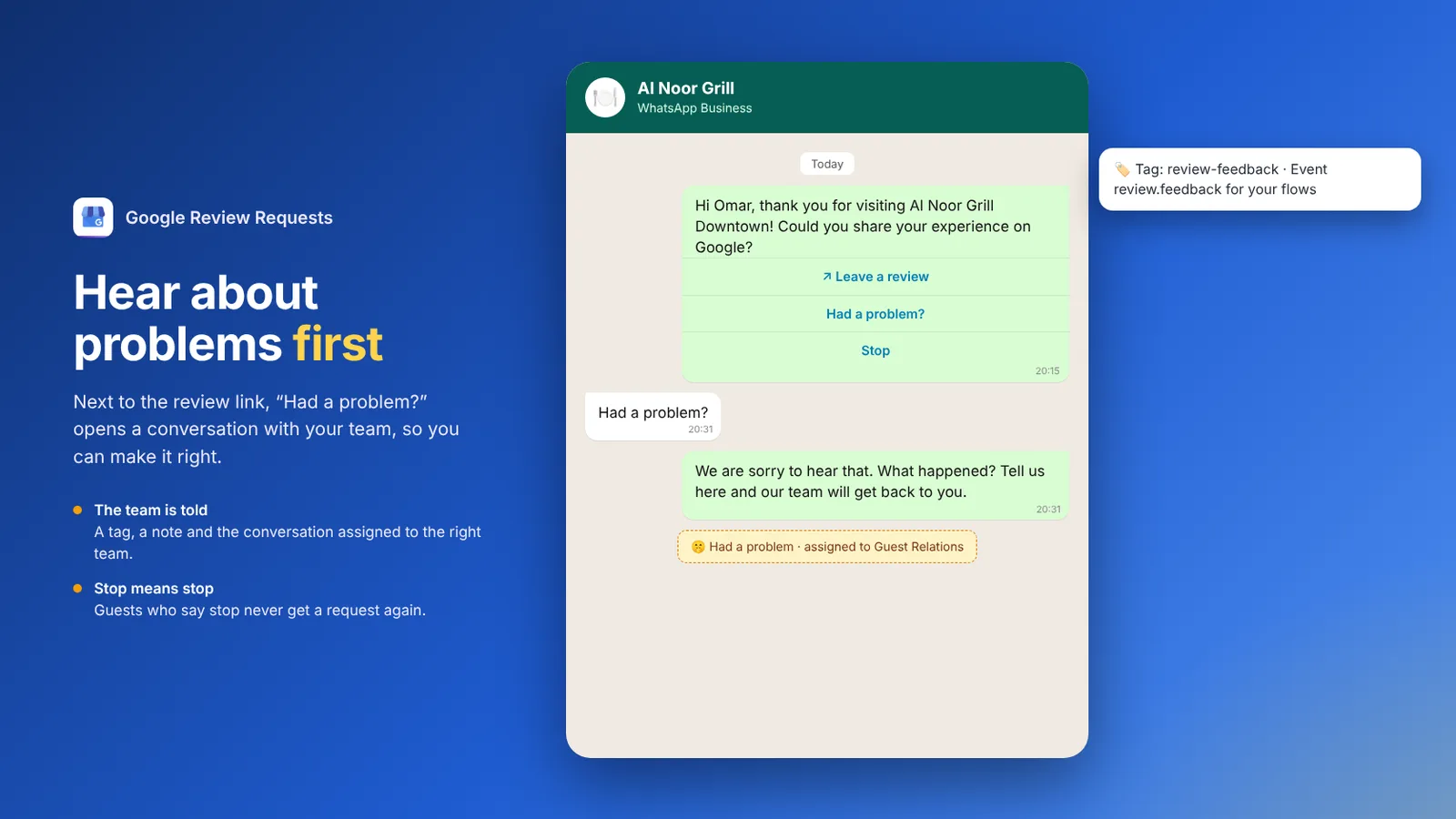
Every customer gets the review link: the app never decides who is happy enough to be asked. “Had a problem?” sits next to the link, never instead of it, and reaches your team with a tag, a note and an event for your flows. No rewards, no asking for five stars.
Inside the app
-
Four ways in
Your system calls a simple API (one customer or up to 500 at once, with a branch, a language, the visit time and your own id so nothing is sent twice), a CSV file from your POS, MonoChat triggers (a conversation closed, a payment received, a tag added), or your team with “Send review request” beside the conversation.
-
Every channel
A customer who wrote on Instagram, Messenger, web chat or Telegram gets the location’s free-form message while the channel allows it; SMS works from your SMS number.
-
Respectful by default
Waits after the visit (2 hours by default), never sends in the quiet hours or on the days you choose, one request per customer in 90 days, a daily limit per branch if you want one, and one optional reminder.
-
Easy to stop
The “Stop” button or a reply like STOP, إيقاف or Durdur opts the customer out for good, with one short confirmation in their language. Customers with the opt-out tag never get a request.
-
Test mode
Nothing goes to customers: each request is written as a whisper in the conversation, showing exactly what would go.
-
Today and reports
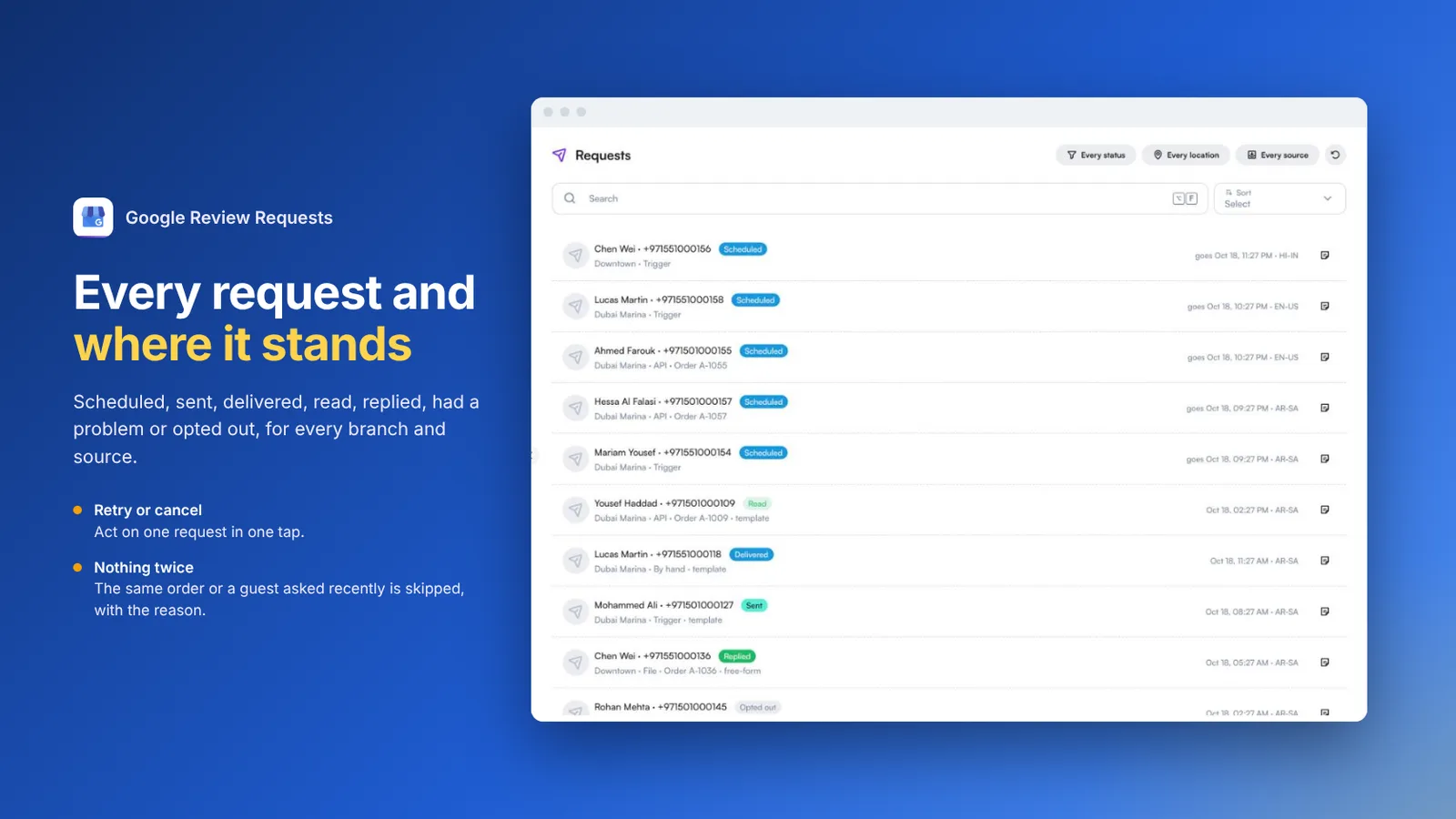
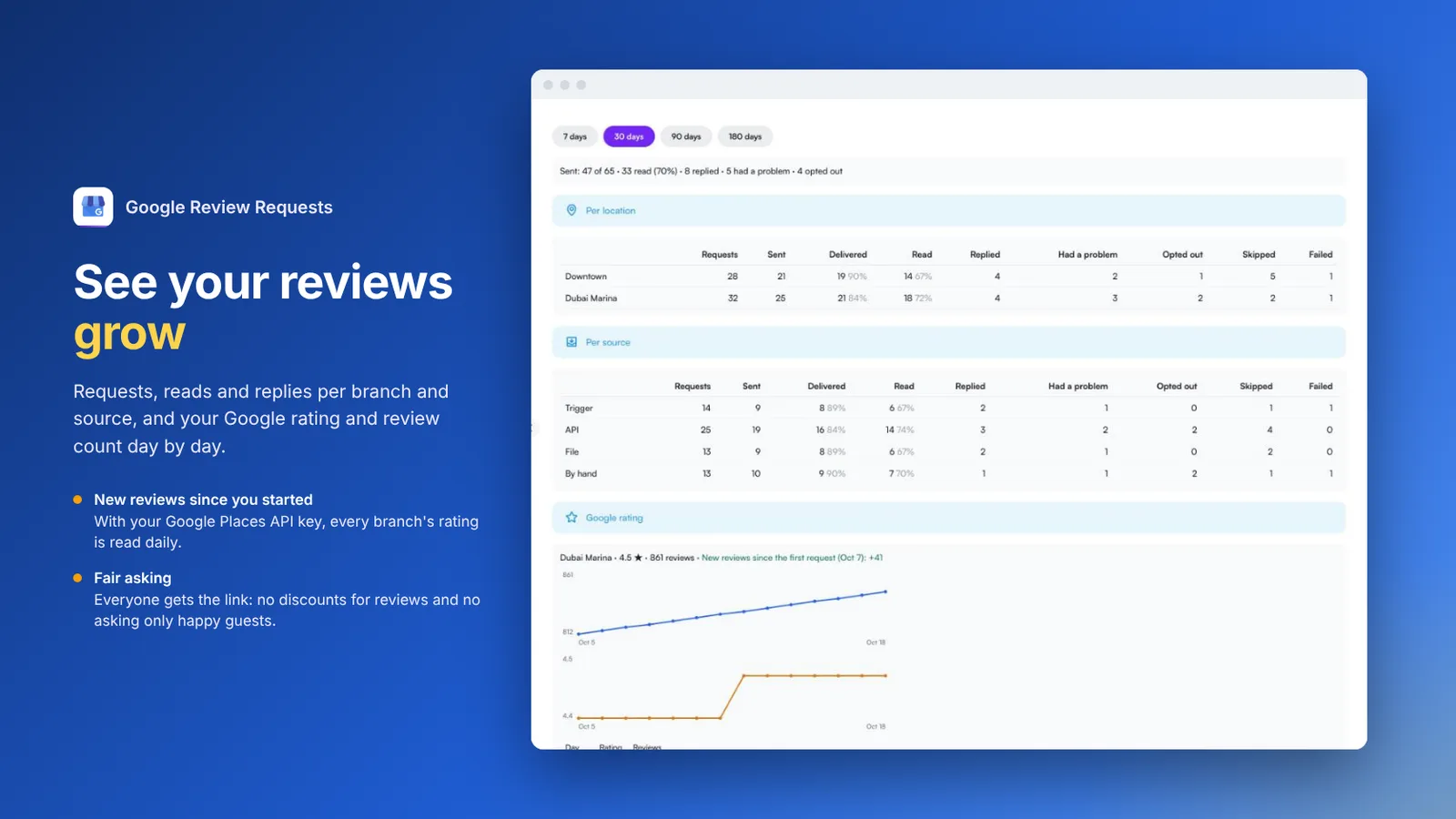
Requests sent, read, replies, “had a problem” and opt-outs. Every request shows its way from scheduled to replied, or why it was skipped, with Retry and Cancel. With your own Google Places API key, each branch’s rating and review count day by day.
Getting started
-
Install the app
Install Google Review Requests in your workspace. Sample data lets you see every screen before your first request.
-
Add your branches
Add each location with its Google Place ID or review link, its languages and the channel to send from, and test the link.
-
Prepare WhatsApp
Copy the ready template into WhatsApp Manager or send it for approval from the app. Review requests are almost always approved as Marketing.
-
Send your customers
Connect your CRM or POS through the API, upload a CSV, turn on a MonoChat trigger or send from a conversation. Try it in test mode first.
Good to know
- You need your branch’s Google Place ID or review link (Google’s Place ID Finder shows it). A Google Places API key is optional.
- For WhatsApp you need a WhatsApp number in MonoChat and an approved template; review requests are almost always approved as Marketing, and Meta’s marketing prices apply.
- This app is not made or endorsed by Google. Google is a trademark of Google LLC.
Screens
FAQ
Frequently asked questions
Short answers to the questions we hear most.
Is it allowed to ask customers for Google reviews?
Yes, asking every customer is allowed. Google removes reviews that were asked for unfairly: with rewards, by asking only happy customers, or by asking for specific ratings or words. The app sends the link to everyone, has no reward field and never asks for five stars.
Which channels does it send on?
WhatsApp, and Instagram, Messenger, web chat or Telegram while the channel allows a free-form message. SMS works from your SMS number.
How does my CRM or POS send the customers?
Through a simple API call with one customer or up to 500 at once, or a CSV file you upload. You can send a branch, a language, the visit time and your own id so nothing is sent twice.
Which languages are included?
All 35 languages of MonoChat, with ready translations of the request, the reminder, the opt-out confirmation and the “Had a problem?” reply. Each branch picks its languages, and you can change every text.
What happens when a customer had a problem?
“Had a problem?” sits next to the review link. A customer who presses it reaches your team with a tag, a note and an event for your flows, and gets a short reply in their language asking what happened.
Can I see my Google rating change?
Yes, with your own Google Places API key: each branch’s Google rating and review count day by day, and the reviews gained since the first request.
Other apps
-
Lead Ads Follow-up
Sends WhatsApp template messages to people who fill your Facebook and Instagram Lead Ads forms, at the delay you choose. -
ClickUp Lead Sync
Turns leads and orders from your conversations into ClickUp tasks, and brings your team’s changes back to MonoChat. -
MonoChat Toolkit
Ready-made AI tools and flow nodes: menus, surveys, appointments, leads, coupons, branches, email, Google Sheets and more. -

MonoChat Start
Give it your website, and in two minutes an AI assistant answers your customers on WhatsApp, Instagram and your site. -
CompanyAI
An AI assistant built from your website: it learns your products, policies and FAQs, sends requests and complaints to the right department as tasks, and searches your Shopify store. -
MonoChat Tasks
Turn conversations into tasks: assign them, move them through your own states, discuss them in comments and set reminders, next to the chat. -
WhatsApp Template API
Send approved WhatsApp templates from your CRM, ERP or online shop with one API call; replies arrive in your MonoChat inbox. -
Session Link
One API call returns a link to a customer’s conversation in MonoChat, creating the customer and the conversation if needed, and can assign it to an agent or workgroup. -

Ads Referral Report
See which Meta ads and posts start conversations: every chat from a click-to-WhatsApp or Instagram ad, by ad, day and channel.
First month of Growth on us
Bring every customer conversation into one place.
Connect your first channel in minutes. Basic is free for 1,000 outgoing messages a month.
One code per business • 30 days to redeem • No card needed